
All Pages in One Menu
The Categories widget has offered “– All Categories –” for a long time. Page menus could only display one top-level page and its children. To show every section of a site, you had to stack several widgets or use custom code.
Version 9.12 adds “– All Pages –” to the Pages block and the Pages widget. One menu now lists every top-level page, each with its own child pages.
The option works with any post type the menu displays. Its label uses the post type’s name, so a products menu shows “– All Products –“.
Requires Basic Version 9.9
“– All Pages –” requires version 9.9 or higher of the basic plugin. If you update PRO first, the option stays hidden until you update the basic plugin. Your existing menus are not affected either way.
How to Enable It
- Check “Display menu on every page”.
- In the “Highest level parent page” list, select “– All Pages –“.
New blocks select “– All Pages –” by default when you check “Display menu on every page”. Existing menus keep the page you already selected.
Don’t see “– All Pages –“? Update the basic plugin to version 9.9 or higher.
Display
Menu generates using this page as the top level item.
Menu generates using this page as the top level item.
How Other Settings Apply
Each top-level page and its child pages act like a separate menu, so your existing settings apply to each one.
- Display highest level parent page: When unchecked, the menu shows only the child pages of each top-level page.
- Display menu when there is only the parent page: A top-level page without child pages appears only when both this option and “Display highest level parent page” are checked.
- Always display child pages: When checked, all child pages show. When unchecked, only the current page’s section opens.
- Excluded pages: An excluded top-level page is hidden along with its child pages.
- Accordions: Each top-level page opens and closes on its own.
If none of the pages has anything to show, the menu is hidden.
“Display the current page’s direct family only” shows only the current page’s family, so the menu shows one top-level page instead of all of them. If you check both options, a notice explains this.
Styled as One Menu
With border and separator styles turned on, the menu reads as one continuous list instead of a stack of separate boxes.
- One border surrounds the whole menu.
- Separators appear between top-level pages.
- There are no gaps between sections.
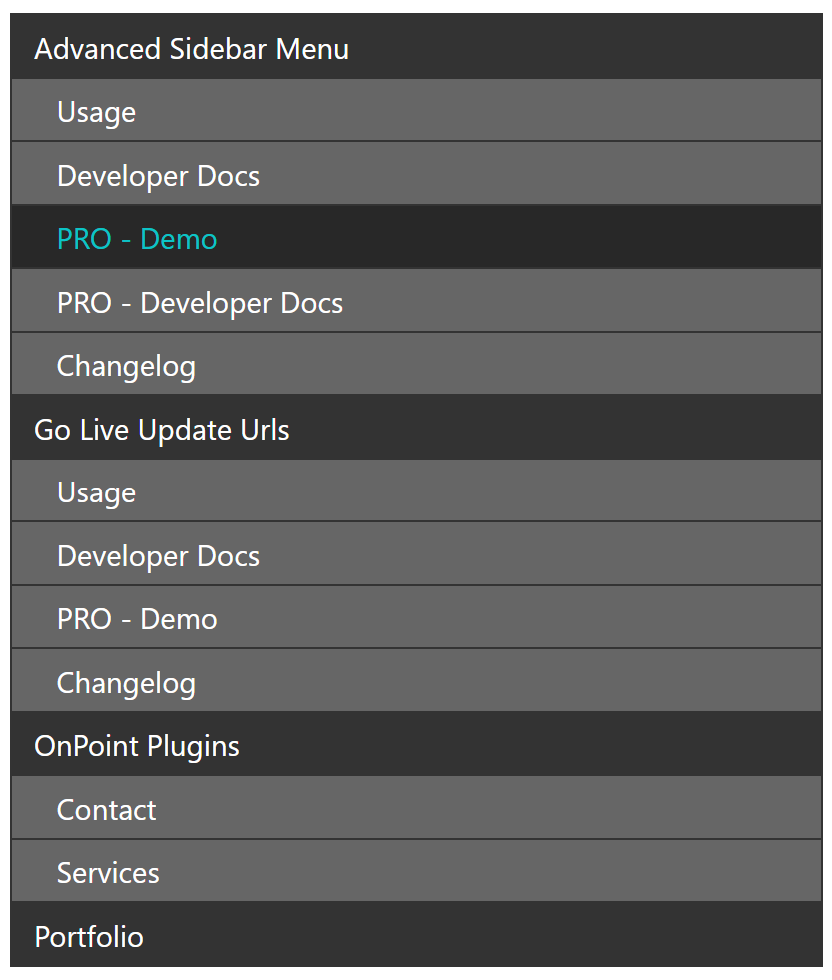
Menus with a single top-level page look the same as before.
All Categories in the Categories Block
The Categories widget has long offered “– All Categories –” under “Display widget on every page”. The Categories block now offers it too.
- “– All Categories –” is the first choice in the “Highest level parent category” list. The label uses the taxonomy’s name, such as “– All Tags –” for tags.
- New blocks select it by default when you check “Display menu on every page”.
- Switching the taxonomy resets the selection to “– All Categories –“.
Categories widgets saved with “– All Categories –” now keep that setting after you convert them to blocks.
Faster Page Menus
Page menus now load faster, especially “– All Pages –” menus on sites with many pages. Saved menu data is reused more often, and it is cleared when a page is deleted as well as when it is saved. This requires version 9.9 of the basic plugin.
Fixes
- Excluded categories no longer appear in menus that use “Display widget on every page”. This applies to “– All Categories –” and to a selected parent category that is excluded.
- The Categories widget’s “Highest level parent category” list no longer shows excluded categories. A category you already selected stays in the list.
- The Categories block now asks you to pick a new parent category if the selected one was deleted. Before, the menu showed nothing.
- On sites with more than 100 top-level categories, the selected parent category now shows correctly in the block settings.
- The “Display the current page’s direct family only” label now uses the singular name (for example, “product” instead of “products”).
- Fixed block style settings overlapping in the editor in WordPress 7 and higher.
- Fixed menu styling showing up on other page lists on the same page.
Miscellaneous
- Tested up to WordPress 7.1.3.
These changes shipped earlier in the 9.11.x maintenance releases:
- Screen readers now announce the menu item name on each accordion toggle.
- Improved the default page ordering.
- Officially added support for PHP 8.5.
- Added support for WordPress 7.1.
- Updated build tools to resolve security alerts.
For Developers
- New
advanced-sidebar-menu/menus/page/top-level-page-idsfilter in the basic plugin. Return several page IDs to render one tree per page in a single menu. It mirrors the existingadvanced-sidebar-menu/menus/category/top-level-term-idsfilter. - When several top-level pages are displayed, a theme override of
page_list.phpruns once per tree. The title still prints once. - Top-level term IDs returned by
advanced-sidebar-menu/menus/category/top-level-term-idscallbacks now go through the exclude check. List_Pages::add_list_item_classes()is now static and registered once. Classes apply only to lists built byList_Pages.- New
Utils::clean_post_ids()method for sanitizing lists of post IDs. Cacheentries are keyed byget_postsarguments only, so identical child page queries share an entry regardless of render state.Cachemethods now takeget_postsarguments instead of aList_Pagesinstance.- “– All Pages –” menus find which top-level pages have children in one query, then skip childless pages without extra queries.
- The
advanced-sidebar-menu/menus/page/excludedfilter now runs once per menu instead of on every lookup. - Upgraded js-boilerplate to version 11.